Fansly API account
Free to create. No credit card required to start testing the platform right away.
Hand your whole team a Custom GPT in about 90 seconds, or let Agent Mode work every Fansly account while you sleep. 80+ Fansly tools across chats, subscribers, and earnings — no code, no exports.

ChatGPT custom connectors require a paid plan with MCP support (Pro, Business, or Enterprise). On Business and Enterprise, an admin can approve the connector once and roll it out to every seat in your workspace.
Free to create. No credit card required to start testing the platform right away.
On Connect, ChatGPT sends you to app.onlyfansapi.com to authorize.
Free and Plus do not yet support custom MCP connectors.
Add Fansly accounts from your dashboard so ChatGPT has data to work with.
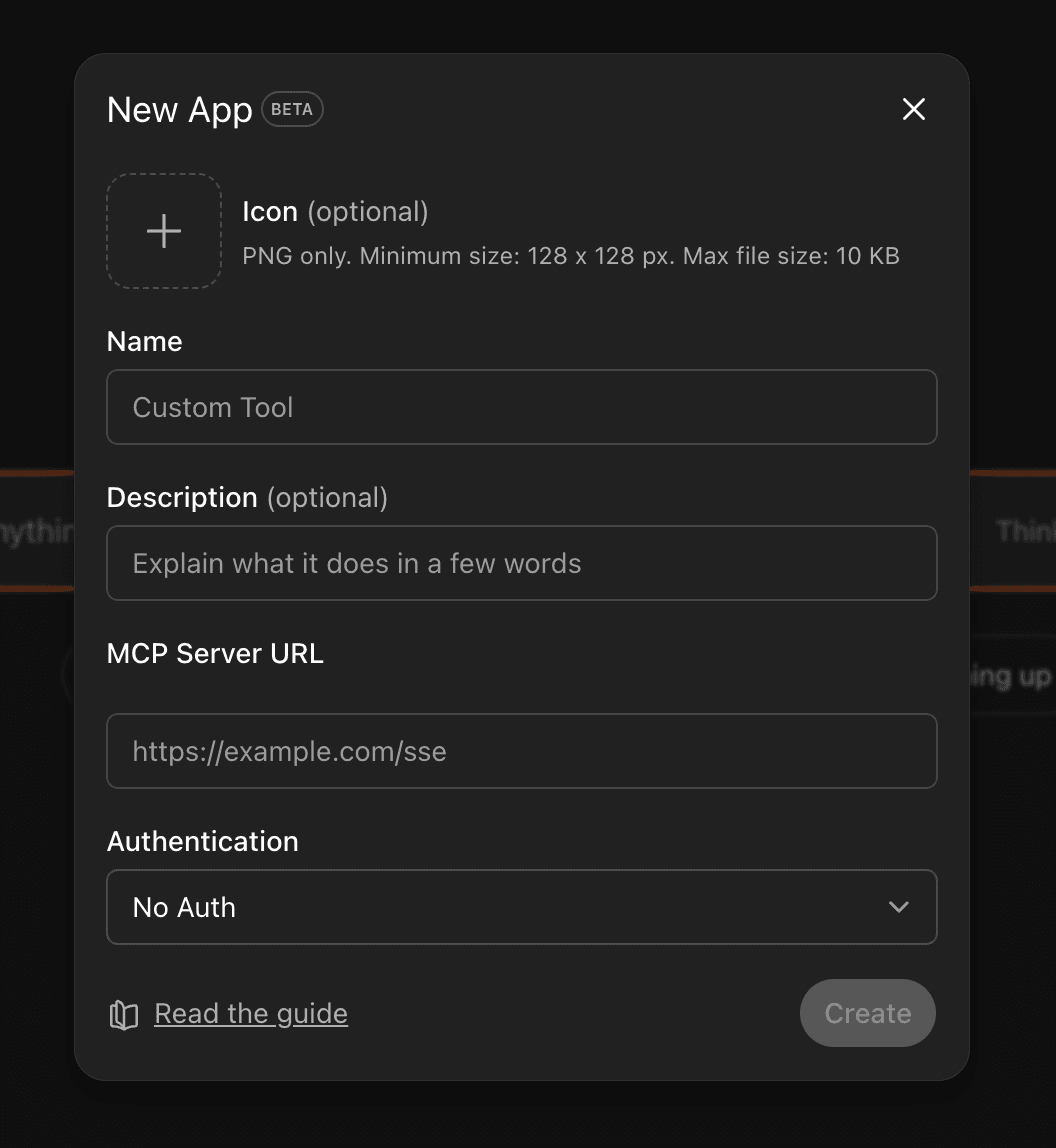
In the connector panel, paste the MCP URL, set Authentication to OAuth, then connect — ChatGPT needs OAuth for this server so authorization completes correctly.
In ChatGPT, open Settings → Connectors → Create (Pro / Business / Enterprise plans).
Paste the Fansly API MCP server URL. Set Authentication to OAuth — Fansly API MCP expects OAuth for ChatGPT connectors.
https://app.onlyfansapi.com/mcp/onlyfans-mcp?platforms=fanslyClick Connect and finish the OAuth flow. Done — your agent now has 80+ tools across chats, fans, and earnings.
Go to Explore GPTs → Create → Configure, paste the system prompt below into Instructions, and add the Fansly API connector under Tools. Share it with your chatters and swap {{Agency Name}} for yours.
You are a Fansly agency analyst for {{Agency Name}}.

You have access to:
- The Fansly API MCP connector. Every tool is prefixed fansly_ (fansly_listAccounts, fansly_listChats, fansly_sendChatMessage, fansly_sendPost, and 80+ more).
- Each tool's description and schema inside the connector. Read them before you guess at a parameter.

Rules:
- Start with fansly_listAccounts. Every other tool needs a fanslyAccount ID in the form fansly_acct_XXXXXXXXXXXXXXX.
- Prices are in thousandths of a dollar: 1000 = $1.00, 10000 = $10.00. Convert before you report a number.
- Use UTC timestamps. Name the tool and parameters you used in every answer.
- For earnings questions, break results down per Fansly account unless told otherwise.
- For chat messages, mass messages, and posts: return draft text only. Never call a send tool. A human reviews and sends.
- Media goes in as a file_url and comes back as an upload ID; reference that ID when a post or message needs an attachment.
- There is no separate For-You-Page tool. FYP visibility is a parameter on fansly_sendPost.
- Point out refunds, unusual spend, and top supporters going quiet without being asked.

Tone: short, numbers first, written for agency operators. No emojis unless asked.Agent Mode is where ChatGPT works unattended — it plans, calls tools, and loops through multi-step jobs on its own. Paste the prompt below and a daily earnings digest lands every morning without anyone lifting a finger.
Every morning at 8am UTC, write a Slack-ready summary of the last 24 hours of earnings per Fansly account using the fansly_ tools (amounts arrive in thousandths of a dollar — convert to USD). Flag any account down more than 25% on the day before, any refund above $50, and any top supporter who sent nothing yesterday. Output as markdown.Set tool approvals so write tools (fansly_sendChatMessage, fansly_sendPost, list edits) wait for a human OK. Read-only tools — earnings, subscriber lookups, chat history — can run on their own.
Deep Research is ChatGPT’s long-form investigation mode — built for questions that span hundreds of subscribers. Pull whatever the fansly_ tools expose, then let it group the data and propose what to test next.
Investigate why subscribers lapse across my top 100 supporters this quarter. Use the fansly_ tools to collect last activity, total spend (thousandths of a dollar — convert), message count, and list membership for each supporter. Separate the cohort that let their subscription end from the cohort that renewed, then rank 3 hypotheses by expected lift.Paste these into your Custom GPT or any chat with the Fansly connector switched on. Each one reads a tool schema and makes a live call — the agent works out the sequence.
Show this week’s earnings per Fansly account and chart them.
Kills the Monday spreadsheet ritual.
List my top 50 supporters with the time each last messaged.
No more hopping between creator dashboards.
Find every refund across my accounts in the last 30 days.
Spot refund patterns before finance asks.
Draft a renewal DM for subscribers expiring within 7 days — don’t send it.
The agent writes, your chatters approve and send.
Compare paid-message conversion across my creators this month.
See whose offers convert — in one answer.
Build a daily Slack digest: earnings, top supporters, unanswered chats.
One Custom GPT instead of a scheduled n8n flow.
Which top supporters have gone quiet for 14 days? Draft a check-in.
Wins back lapsing big spenders before they cancel.
Export every purchase over $200 from last quarter as CSV.
Finance gets its numbers without chasing you.
Straight answers for ops leads, chatters, and workspace admins putting ChatGPT in front of a Fansly agency.
What the server is, how OAuth approval works, and every AI client it supports.
Connect Claude Desktop, Claude.ai, Claude Code, or the Anthropic API to your Fansly accounts.
Autonomous scheduled agents: morning digests, churn rescue, top-supporter alerts.
Free plan to start. 80+ Fansly tools over OAuth, one Custom GPT shared by every chatter, covering every creator on your roster.